Windows users and groups have different privileges and duties. Administrator accounts have full access to system resources and settings and can manage other users.
Identify the Current User
# identify the account accessing the system
whoami
Output uses
domain\username; a standalone host shows the hostname in place of the domain.
Local Users
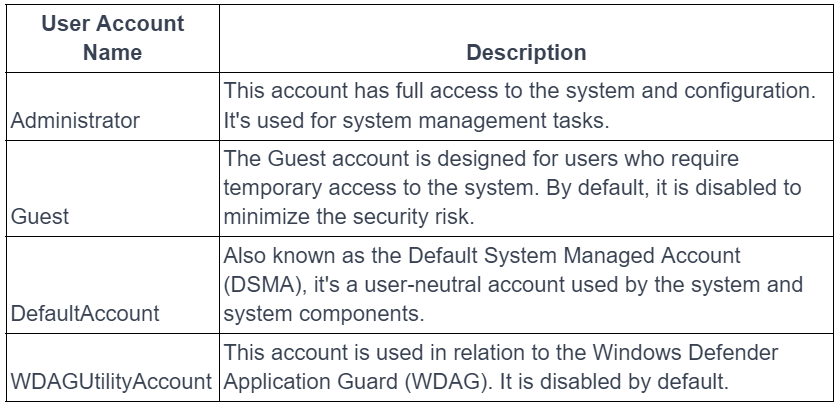
Open Start → Computer Management → Local Users and Groups → Users to manage users. Default users:
Users should have only the authority they need, with a limited number of administrator accounts.
Groups
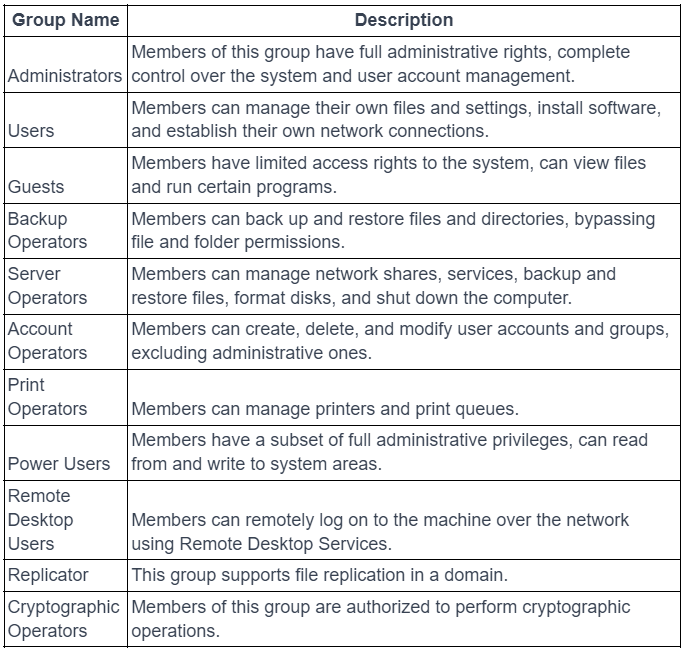
Groups simplify management of users and resources. Local groups manage resources on one computer; domain groups manage resources across computers on a network.
Default groups on Windows Server:
User Management
These functions are also available through Windows + R → lusrmgr.msc.
# list users on the system
net user

# display details for a specific user
net user <user>

# view password settings and logon restrictions
net accounts
Group Management
# list local groups
net localgroup

# view users in a group
net localgroup <group>