Windows users have profiles and permissions that restrict access to files and folders. File permissions are inherited from the parent folder.
File Permissions
Right-click a file or folder, then select Properties to view its permissions. Six permission types exist:
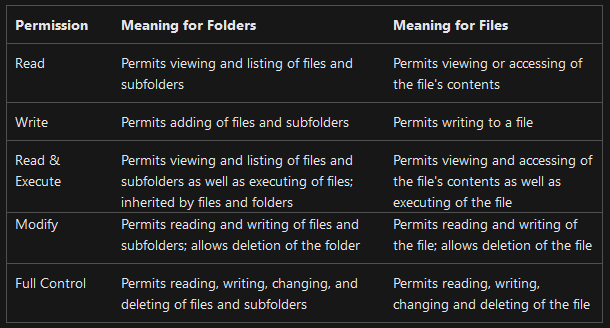
Use Properties → Advanced to change permissions.
Users without administrator privileges cannot access other directories in the Windows environment.
UAC
User Account Control (UAC) prevents unauthorized access without administrator permission and can be bypassed.
| Level | Behavior |
|---|---|
| Always notify | Notify before applications and users make changes; the most secure level. |
| Notify me only when apps try to make changes to my computer | Notify when applications attempt changes. |
| Notify me only when apps try to make changes to my computer (do not dim my desktop) | Notify without dimming the desktop. |
| Never notify me | Disable notifications. |