3.1
Cloud Infrastructure
Cloud responsibility matrix details who is responsible for security
hybrid cloud is more than one public or private cloud
infrastructure as code describes servers, networks, and applications as code
serverless (Function as a Service, FaaS) architecture
- applications are separated into individual, autonomous functions. There is no OS
- runs in a stateless compute container
monolithic applications
- one big application that does everything
- one big executable
- poorly scalable and updatable
Application Programming Interfaces
- APIs glue microservices together to act as the application
Network Infrastructure Concepts
Air gap
- devices are physically separate
physical segmentation
- separate devices
loigcal segmentation
- Virtual Local Area Network (VLAN)
- separated logically instead of physically
- two VLANS cannot communicate with each other without layer 3 device
Software Defined Networking (SDN)
- details how networking devices have 3 functional planes of operation
- Data
- process the network frames and packets. (forwarding, trunking, encrypting, …)
- control
- manages actions of the data plane (routing tables, session tables, dynamic routing protocol updates, …)
- management
- configure and manage the device (SSH, API, …)
- Data
- split the functions into separate logical units
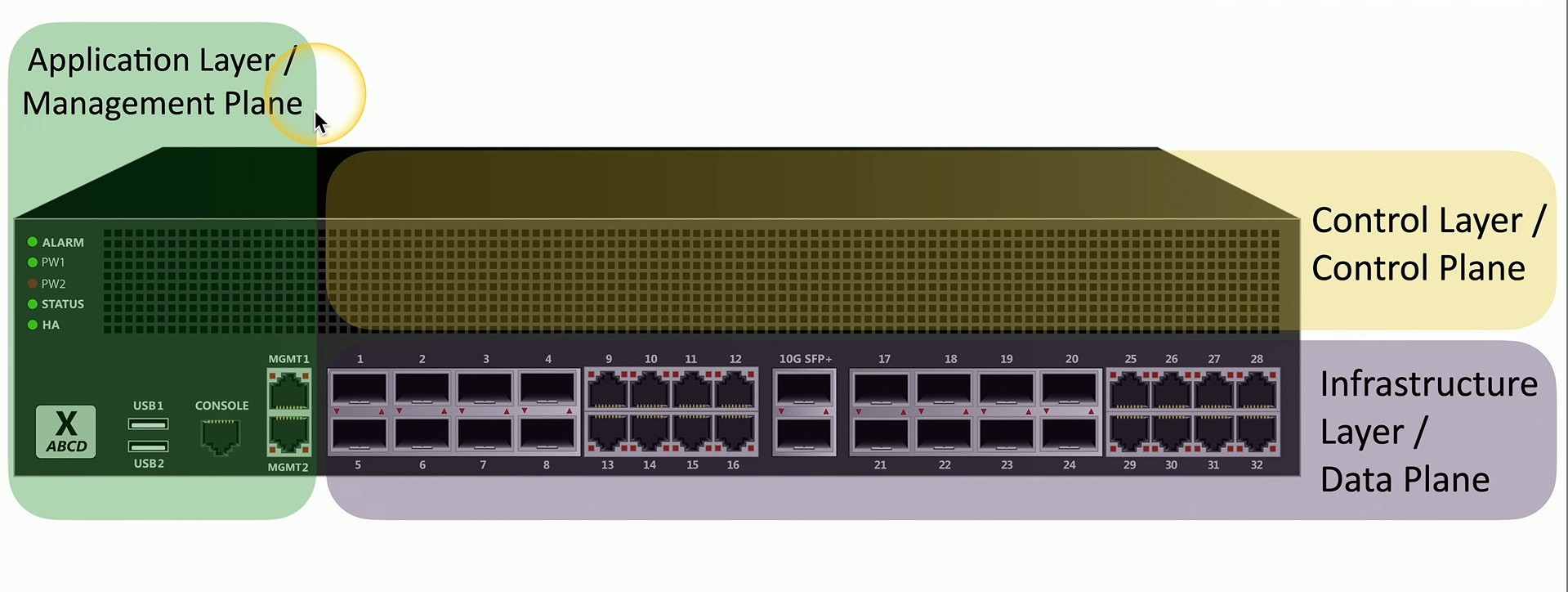
Devices have data/control/management planes. Traditional networking: control plane lives inside each device. SDN: control plane is logically centralized in a controller which programs the data plane on devices (via protocols/APIs). Management plane is how humans/tools interact, but SDN is mainly about control ↔ data separation.
On-premises security
- customize your security posture
- on-site IT team can manage security better
- Local team maintains uptime and availability
Decentralized security
- you want a consolidated console view
- though single point of failure
virtualization
- run many different operating systems on the same hardware
- can tear down and build OSes quickly
application containerization
- container contains everything you need to run an application
- containers are isolated processes in a sandbox
- lightweight
Internet of Things (IoT)
- e.g. sensors, smart devices, wearable technology, facility automation
- weak defaults, often have poor security
Supervisory Control and Data Acquisition System (SCADA)
- multi-site Industrial Control Systems (ICS)
- allows technicians to sit in a centralized control room
- requires extensive segmentation
non-deterministic operating system
- no single process can grab all the resources and take priority
Real-Time Operating System (RTOS)
- deterministic operating system
- e.g. car OS, when you break, the breaking must take control of all other resources
- Extremely sensitive to security issues
- need to always be available
Embedded systems
- hardware and software for a specific function
- is built with only one task in mind
- e.g traffic light controllers, digital watches, medical imaging systems.
high-availability (HA)
- always on, always available
Infrastructure Considerations
Availability
- system uptime
- available to the only right time
Resilience
- can you recover quickly
- Mean Time to Repair (MTTR)
Cost
Responsiveness
- how quickly can i get response?
scalability
- elasticity - how quickly can i increase or decrease capacity
ease of deployment
risk transference
- transfer risk to a 3rd party
- cybersecurity insurance
- downtime is covered
- protect against legal issues from customers
ease of recovery
patch availability
inability to patch
- embedded systems
power
compute
Secure Infrastructure
e.g. Firewalls (separate trusted from untrusted)
security zones
- zone-based security technologies
- logically separate by use and access type
- trusted, untrusted
- or internal, external
attack surface
- everything can be a vulnerability
- goal is minimize the surface
connectivity
- network connection contributes to security
- secure the network cabling
Intrusion Prevention
Instrusion Prevent System (IPS)
- watch network traffic and stop it before it gets into the network
failure modes
- fail-open, when a system fails data continues to flow
- fail-closed, when a system fails data stops flowing.
Device connections
- active monitoring: system is connected inline, data can be blocked as it passed by.
- IDS/IPS sits in inline = all traffic passes through them
- malicious traffic is dropped
- passive monitoring: copy of network traffic is examined and data cannot be blocked in real-time
- Examine a copy of the traffic via a port mirror (Switch Port Analyzer SPAN) or network tap
- no way to block, common with IDS
Network Devices
Jump server
- A device in the network accessible from the outside
- Often highly secured
- SSH/tunnel/vpn to jump server and then RDP/SSH to computers in network
Proxies
- sits between the users and the external network
- receives a user request and sends the request on their behalf
- can be transparent (the user doesn’t know it exists)
Network Address Translation (NAT)
- a type of proxy that converts between internal and external IP addresses
Application proxies
- e.g. HTTP proxy
A proxy is an application-layer middleman. The client’s web traffic is sent to the proxy, and the proxy fetches the internet content on the client’s behalf.
Forward proxy
- a user makes a request to an internal proxy server and the proxy makes the request to the internet
Reverse proxy
- users on the internet connect to a proxy and the proxy makes the requests to the internal web server
Open proxy
- third party uncontrolled proxy
Load Balancer
- distribute the load to multiple servers
- keeps load even accross devices
- fault tolerance recognizes when a server fails changing the load elsewhere
Active/active load balancing
- manage across servers
- uses TCP offload which keeps the TCP connection open to all the servers
- SSL offload makes the load balancer responsible for encryption decryption
- etc.
active/passive load balancing
- some servers are active and others are on standby
Port security
Extensible Authentication Protocol (EAP) is the framework used to carry authentication messages (the “how” of authentication).
IEEE 802.1X is the standard that enforces port-based Network Access Control (NAC) on a switchport or Wi-Fi association (the “where/when” access is granted).
Core idea: a device gets no normal network access until it successfully authenticates. Before that, it’s either blocked entirely or limited to a restricted/guest state.
Roles involved (the 3 parties)
-
Supplicant (client)
The endpoint trying to connect (laptop, phone, workstation). Runs 802.1X software and responds to auth prompts. -
Authenticator (access device)
The switch or wireless AP controlling the port/association. It doesn’t validate passwords/certs itself; it just enforces access and relays messages. -
Authentication Server (AAA server)
Usually a RADIUS server (often backed by AD/LDAP/PKI). It validates the client’s credentials and returns an “allow/deny + policy” decision.
Firewall Types
Universal security control that control the flow of traffic.
Network-based firewalls
- OSI Layer 4 (TCP or UDP port) vs OSI Layer 7 (application layer)
- Encrypt traffic
- Can also operate as layer 3 devices (routers)
Unified Threat Management (UTM)
- an all-in-one security appliance
- URL filtering / content inspection
- Malware inspection
- spam filter
- firewall
- IDS/IPS
- etc.
- usually only operate at layer 4
Next-generation firewall (NGFW)
- OSI layer 7
- does a full packet decode of every packet
- can control traffic based on the application
- usually has an IPS
- as well as content filtering
Web application firewall (WAF)
- applies rules to HTTP conversations
- allow or deny based on expect input
- e.g. blocking SQLi
- can be used alongside an NGFW
Secure Communication
Virtual Private Networks (VPN)
- encrypts private traversing public network
- uses a concentrator as the access device that handles encryption/decryption
- often built into the OS
the encrypted tunnel
- the IP header and data of the packet is encrypted.
- they are embedded within an another packet with IPsec headers and trailers
SSL/TLS VPN
- used for remote access communication
- can be run from a browser
site-to-site ipsec vpn
- firewalls act as VPN concentrators
- one firewall per concentrators
software defined network in a wide area network (SD-WAN)
- WAN built for the cloud
- cloud-based applications communicate directlyto the cloud
secure access service edge (SASE)
- a next generation VPN
- security technologies are in the cloud
- SASE clients on all devices
States of Data
Data at rest
- data on a storage device
- encryption is best and access control lists
data in transit
- data transmitted over the network
data in use
- data actively proccessed in memory
- data is almost always decrypted
- e.g. ram, cpu registers
data sovergeignty
- information that you are storing in a country and therefore all regulations are subject
- General Data Protection Regulation (GDPR)
- data collected on EU citizens must be stored in the EU
Protecting Data
Geofencing
- automatically allow or restrict access based on a location
Segmentation
- instead of using a single data source, separate out the data
3.4
Resiliency
Server clustering
- combine two or more servers to appear as a single large server
- increase capacity, availability and scalability
Recovery site
- in case your main site goes down
- hot site
- exact replica of our
- cold site
- empty building, no hardware
- warm site
- somewhere between cold and hot
Continuity of operations planning (COOP)
- if there are no fallback sites
- we need a find a non-technical fallback solution
Capacity Planning
match supply to the demand
People
- some services require human intervention
- difficult resource to ramp up or down
- large business expense
Technology
- should be able to easily scale
Infrastructure
- Underlying framework
- physical devices = buy, configure, install
- cloud-based devices
- easier to deploy
Recovery Testing
Test yourself before an actual event
tabletop execises
- performing full-scale drills can be very costly
- talk through a simulated disaster instead with key players
Fail over
- users are redirected to backup systems without them knowing to test
- needs redundant infrastructure
Simulation
- test with a simulated event
- phishing, password requests, data breaches
Parallel processing
- split a process through multiple CPUs
- split complex transactions over multiple processors
- improved recovery
Power Resiliency
Uninterruptible Power Supply (UPS)
- can get us through blackouts, brownouts (drop in voltage)
- Types
- Offline/Standby detects blackout and replaces power
- Line-interactive increases voltage slowly during brownouts
- On-line/Double-conversion
Generators
- long-term power backup
Secure Baselines
-
The security of an application environment should be well defined
- checks should be performed often
-
manufacturers provide security baselines