1.1 Security Controls
- Technical controls
- implemented using systems, operating system controls, firewalls
- Managerial controls
- Admin controls, security policies, etc.
- Operational controls
- people set controls ⇒ security guards, awareness programs
- Physical controls
- limits physical access, badge readers
Control types:
- preventive ⇒ block access to a resource (on-boarding policy, door lock, guard shack)
- deterrent ⇒ discourage intrusion attempt but does not directly prevent access
- detective ⇒ identify and log an intrusion attempt, may not prevent access
- corrective ⇒ apply a control after an event has been detected, reverse impact
- compensating ⇒ control using other means when existing controls aren’t enough (firewall blocks a vulnerable app instead of patching)
- directive ⇒ weak security control to direct a subject towards security compliance (make sure subjects understand security/compliance policy)
1.2
CIA Triad
Confidentiality ⇒ prevent disclosure of info to unauth users
- encryption, encode messages
- access controls, restrict access to a resource
- 2FA
Integrity ⇒ manages can’t be modified without detection
- Hashing, sender hashes data and sends it, we receive the data and hash it and see if hashes match
- Digital signature, encrypts hash and confirms sender
- Certificates to identify devices and people
- Non-repudiation
- Proof of integrity, the data remains accurate and consistent
- hashing but doesn’t associate data with an individual
- Proof of origin
-
digital signature signed with private key and public key to decrypt to verify


-
- Proof of integrity, the data remains accurate and consistent
Availability ⇒ uptime
- redundancy
- fault tolerance, systems run even when a failure occurs
- patching
AAA
Authentication ⇒ prove you are who you are (password)
- Devices can have digital certificates to make sure they are indeed the company laptop
- Organizations use Certificate Authority (CA) to create a certificate for a device and sign it
- most orgs have their own CAs
- CA Cert are signed by Root CAs
Authorization ⇒ what access does the authorized user have
- Users and services should have authorization models (scalable and understandable)
- defined by roles, etc
- simple relationship like User → Resource does not scale and is difficult to understand why an authorization may exist
Accounting ⇒ resources used (login time, etc.)
Gap Analysis
Where you are compared with where you want to be (the gap)
Frameworks/Baseline should be used for internal set of goals
- NIST
- ISO/IEC 28001
Zero Trust
Many networks are somewhat open on the inside, but zero trust covers every device, process, person. Everything must be verified, 2FA, encyption, etc.
Planes of operation, split the network into functional planes
- Data plane ⇒ process frames, packets, and network data.
- Control plane ⇒ manages the actions of the data plane, rules and policies
Adaptive identity, consider the source of requested resources, multiple risk indicators into authentication process
Threat scope reduction, restrict entry points
Policy-driven access control
Security Zones ⇒ looks at overall path of where you are coming from and where you are going
- what zones have access to other zones, Untrusted to Trusted zone traffic for e.g.
Policy Enforcement point (PEP)
- gatekeeper that decides all traffic (multiple devices, not just firewall for e.g)
Policy Decision Point (PDP)
- Policy Engine ⇒ evaluates each decision based on policy. grant deny or revoke
- Policy Admin ⇒ Communicates with PEP to generate access tokens or creds and then tells PEP to allow or disallow access.
Physical Security
Prevent access
Channel people through a specific access point
Access Control Vestibules
- Allow or control access to a particular area’
Fencing (must be Robust)
Video surveillance (CCTV close circuit television)
Guards and access badges
- for guards, two-person integrity so no single person has access to a physical asset
Lighting means more security
Sensors
Deception and Disruption
Honeypot ⇒ attract the bad guys and trap them there
- attacker is usually a machine, can be used for recon
- a virtual world to explore
Honeynets ⇒ real networks that includes more than a single device (larger deception)
Honeyfiles ⇒ bait for the honeynet
Honeytokens ⇒ traceable data to the honeynet so if the data is stolen, you’ll know where it came from
1.3
Change Management
Upgrade software, firewall config, patches. Need formal process (policies) to make these changes
Typical Process:
- Request form
- Determine purpose of change
- Identify scope
- Schedule a date and time of the change
- Determine affected systems and the impact
- Analyze the risk associated
- Approval from the change control board
Individuals or entity make the change but the owner of the process just manages the process. e.g. Shipping and Receiving owns label printers but IT handles the actual changes
Stakeholders ⇒ those who are impacted
Impact analysis ⇒ risk value
Sandbox testing environment to test changes
maintenance window
Standard Operating Procedure (SOP)
Technical Change Management
allow / deny list
- any application can be dangerous. Security policy can control app execution
Restricted activities
- anything outside the scope
Downtime
- services will eventually be unavailable
1.4
public key infastructure (PKI)
- Digital certificates
- associate a certificates to people or devices (Certificate Authority)
symmetric encryption (=secret key algorithm)
- encrypt with key
- decrypt with same key
- make sure no one gets access to the key
- doesn’t scale very well
- very fast to use (less overhead than asymmetric)
asymmetric encryption (public key cryptography)
- two or more mathematically related keys
- assign on to private key
- public (anyone can see this)
- private key is the only key that can decrypt data with public key
- you can’t derivate on key from another (not able to reverse engineer)
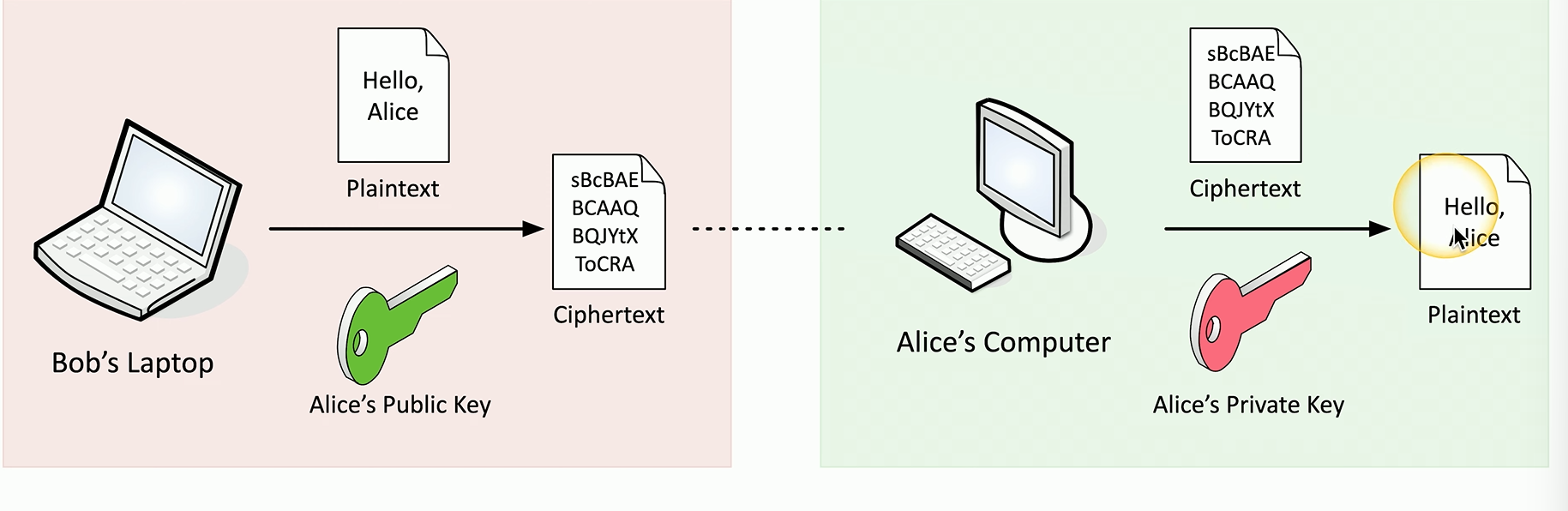
In 100+ users environments we use key escrow
- 3rd parties hold private keys
- good for business arrangement so company can access employee info
Encrypting data
we can encrypt stored data via full-disk encrpytion (e.g. bitlocker on windows, filevault for macos)
we can encrypt files as well
database encryption
- encrypt all DB with symmetric key (transparent encryption)
- overhead to find things
- encrypt individual columns (record encryption)
transport encryption
- encrypting in application (e.g HTTPS)
- VPN
- creates an encrypted tunnel via SSL/TLS. Connectivity via IPsec
algorithms are public, everyone can see how they work but we don’t have the key, not possible to reverse engineer
keys are subject to brute force attacks
- prevented by length of keys
Key Exchange
how do you share the encryption key
- out of band key exchange (not over network)
- in band key exchange (use asymmetric encryption to deliver a symmetric key)
session keys do this.
key exchange algorithms work by generating the identical symmetric key. Possible by encrypting someone else’s public key with a private key. Both ends produce the same key.
Encryption Technologies
Trusted Platform Module (TPM)
- cryptography hardware on modern machines
- random num generator, key generators
- has persistent memory for unique keys burned in during manufacturing
- password protected
Hardware Security Module (HSM)
- for large environments
- store thousands of keys
- has secure storage for keys
- has cryptographic accelerators
Key management system
- on-premises, cloud-based
- manage all keys from a centralized manager
- keys separate from data
Secure enclave
- isolated from main processor
- hardware processor
- monitors the system boot process
- true random number gen
- and more…
Obfuscation
reversible, hiding information in plain sight
- steganography hide data inside image
- also possible via embedded messages in tcp packets
security through obscurity (not a proper means of security)
a form of obfuscation is tokenization, replace data
- done with credit card processing where card numbers are tokenized
- not mathematically related in any way to original number
- not encryption or hashing
data masking is another form of obfuscation
- hide some of the original data
Hashing and Digest
hashes represent data as a short string of text (message digest or a fingerprint)
one-way trip, unrecoverable from the digest
allows to verify integrity
- compare the downloaded file hash with the posted hash value
can be a digital signature
- prove the source of the message
- make sure signature isn’t fake = non-repudiation
- process is
- sign with the private key
- verify with public key, any change to message will invaldiate the signature
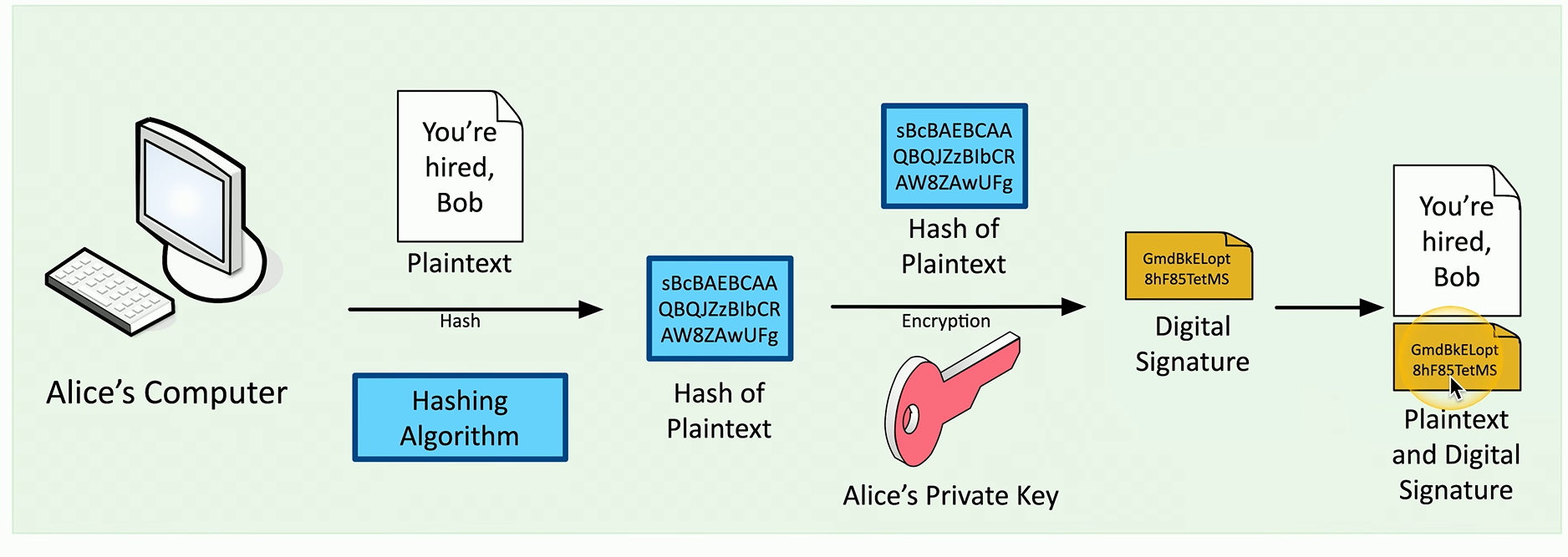
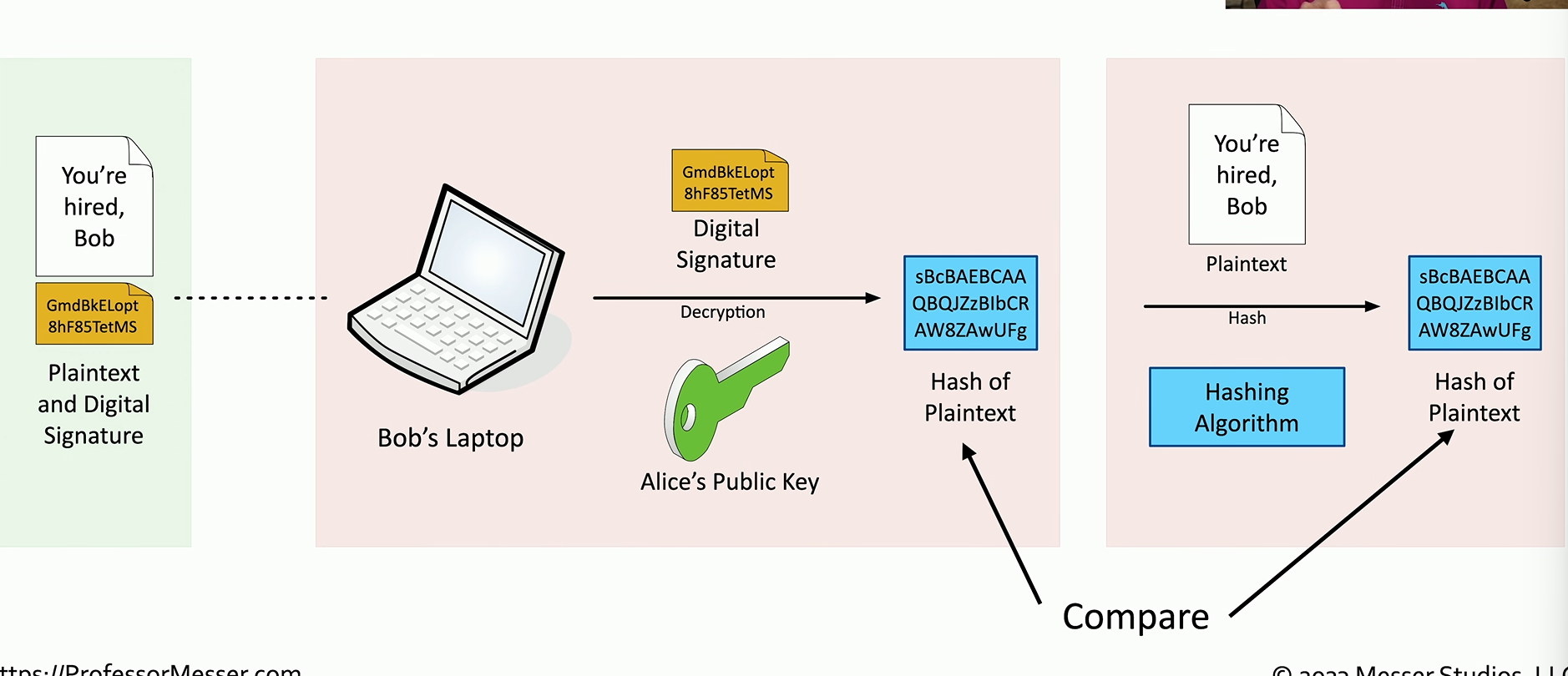
password storage
- store a salted hash, no the plaintext string
SHA256 produces 256 bits/ 64 hexadecimal characters
hash functions should be unique and take an input of any size
- if they aren’t unique will have a collision (MD5 was deprecated for this very reason)
salt, random data added to a password hash when hashing
- rainbow tables map hashes to plaintext, salting prevents that
Blockchain
keeps track of transactions records and replicates to anyone and everyone
common flow:
- a transaction is requested
- the transaction is sent to every computer in a network
- the transaction is added the block
- the block itself is hashes
- the copy of the block is sent to everyone in the blockchain
- each node of the blockchain network verifies the integrity of the block via hashing and it will be rejected
Certificates
public key certificate
- binds a public key with a digital signature
adds trust
- PKI uses Certificate Authority for additional trust
- Web of trusts add others users for additional trust, instead of centralized authority, we have a network of people validating certificates
a digital certificate
- X.509 is the standard format
- contains among other serial number, version, sig algo, issuer, etc.
how do we build trust from something unknown
- something/someone trustworthy needs to provide their approval
- can be hardware, software, etc
for websites we use the Certificate Authority (CA) that the browser already trusts. real-time verification and is built-in.
Websites purchase certificates
- we pay for the verification process
to create a certificate
- we encrypt our information with our public key - Certificate Signing Request (CSR)
- the CA validate the identity of our applicant
- the CA’s private key then generates a digitally signed certificate
for internal workflows we can have our own certificate authority. Devices must trust the internal CA.
Subject Alternative Name (SAN)
- allows certificates to be used for many different domains
certificate revocation list (CRL)
- maintained by the CA
- to revoke trust
- browsers will ensure that the certificate is not in the CRL to continue browsing session
Online Certificate Status Protocol (OCSP)
- A better way then a single file CRL
- The CA is responsible for responding to all client OCSP requests
- instead we can have the certificate holder verify their own status
- OCSP status is stapled into the SSL/TLS handshake and is digitally signed by the CA